
Running Extractions
A run is an extraction job. You select a robot, optionally provide start URLs and/or extraction budget, and Extralt crawls the site to produce captures.
Creating a run
• Dashboard
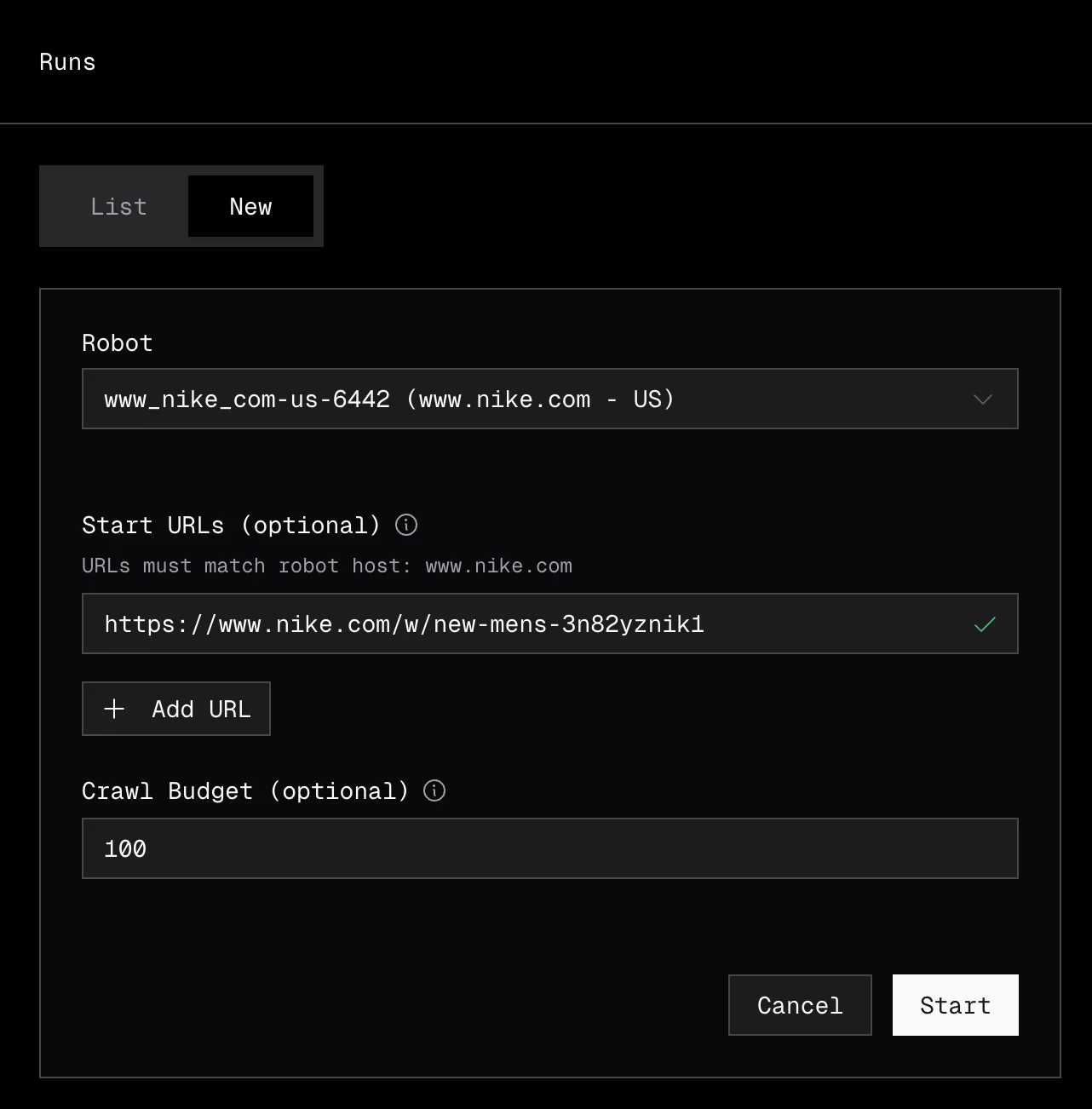
Navigate to Extract > Runs and click New Run, or click Start Run on any robot in the robots list.
Select the robot to use, enter your start URLs (one per line), and optionally set a budget to limit how many URLs the robot will extract. Click Start to begin the run.
• API
export EXTRALT_API_KEY="your-api-key"

curl -s -X POST "https://api.extralt.com/v0/extract/runs" \
  -H "Authorization: Bearer $EXTRALT_API_KEY" \
  -H "Content-Type: application/json" \
  -d '{
    "robot_id": "your-robot-id",
    "start_urls": [
      "https://example-store.com/products/sneakers",
      "https://example-store.com/products/boots"
    ],
    "budget": 100
  }' | jq
The response is 202 Accepted with { "id": "<run_id>" }. Use that ID to poll the run, stop it, or list its captures.
Parameters
| Parameter | Required | Description |
|---|---|---|
robot_id | Yes | The robot to use for extraction |
start_urls | No | URLs to start crawling from. If omitted, the robot uses its default entry points. |
budget | No | Maximum number of Captures to produce. Each successful product-page Capture costs 2 credits. |
auto_enrich | No | If true, automatically run an enrichment job once the run completes. Defaults to false. |
Run lifecycle
| Status | Description |
|---|---|
pending | Run is queued for execution |
starting | Run is starting |
running | Actively crawling and extracting |
restarting | A restart was requested and is being applied |
completed | Finished successfully |
failed | Encountered an unrecoverable error |
stopped | Manually stopped |
Monitoring a run
• Dashboard
Navigate to Extract > Runs to see all your runs in a sortable table.
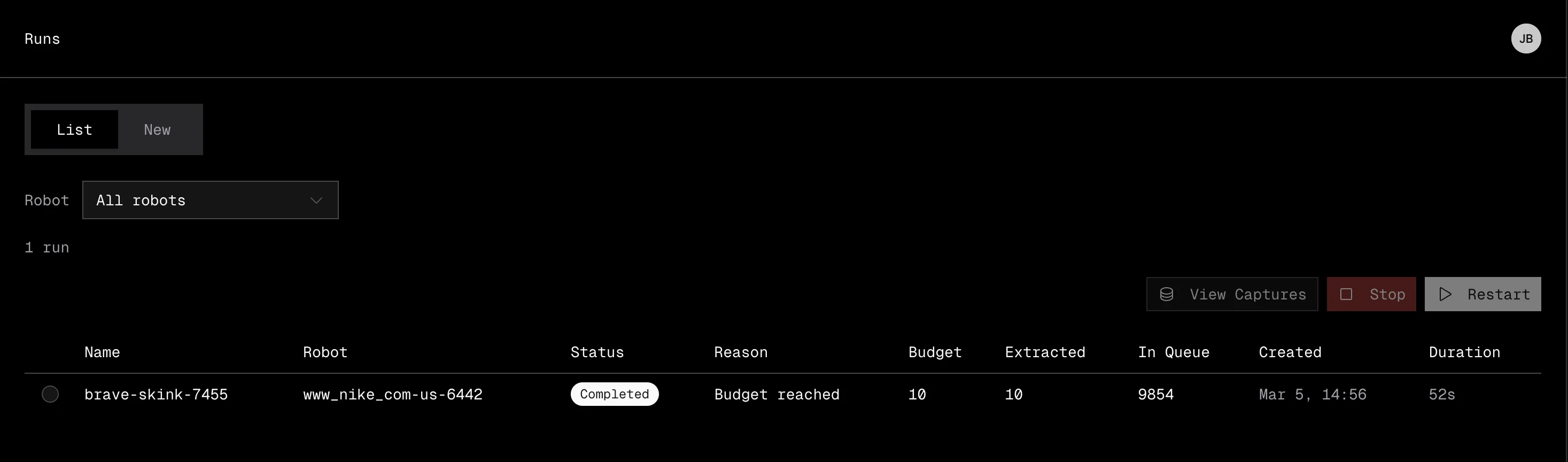
The table shows:
| Column | Description |
|---|---|
| Name | The run name |
| Robot | Which robot is executing the run |
| Status | Current status with a color-coded badge |
| Budget | Maximum URLs to extract |
| Extracted | Number of URLs extracted so far |
| Queue | URLs remaining in the crawl queue |
| Created | When the run was started |
| Duration | How long the run has been running or took to complete |
You can take actions on runs directly from the table:
- Stop a running or pending run to halt extraction early.
- Restart a stopped or failed run, optionally with a new budget.
• API
Poll the run endpoint until it reaches a terminal status:
curl -s "https://api.extralt.com/v0/extract/runs/$RUN_ID" \
  -H "Authorization: Bearer $EXTRALT_API_KEY" | jq
The read response is the full Convex run document with camelCase fields (_id, status, extracted, inQueue, robotId, robotName, createdAt, startedAt, duration, ...).
See Common Patterns for a full polling example.
Stopping and restarting runs
• Dashboard
Use the Stop button on a running or pending run to halt extraction early. Use Restart on a stopped, failed, or completed run to re-execute it (optionally with a new budget).
• API
Stop a run — POST /v0/extract/runs/{id}/stop. No request body. Returns 204 No Content.
curl -s -X POST "https://api.extralt.com/v0/extract/runs/$RUN_ID/stop" \
  -H "Authorization: Bearer $EXTRALT_API_KEY"
Restart a run — POST /v0/extract/runs/{id}/restart. Optional budget in the body overrides the original. Returns 202 Accepted with { "id": "<run_id>" }.
curl -s -X POST "https://api.extralt.com/v0/extract/runs/$RUN_ID/restart" \
  -H "Authorization: Bearer $EXTRALT_API_KEY" \
  -H "Content-Type: application/json" \
  -d '{ "budget": 200 }' | jq
Concurrent run limits
| Plan | Concurrent runs |
|---|---|
| Start | 1 |
| Scale | Unlimited |
If you exceed your concurrent run limit, the run will be queued until a slot opens.
Downloading data
• Dashboard
Export captures directly from Extract > Captures. You can filter by run or robot, then download as JSONL or Parquet. See Working with Captures for details.
• API
The export endpoint streams all captures from a run as a single file. The format query parameter accepts parquet (default) or jsonl. The response includes a Content-Disposition: attachment header — save the body directly to disk.
curl -sL "https://api.extralt.com/v0/extract/captures/export?run_id=$RUN_ID&format=parquet" \
  -H "Authorization: Bearer $EXTRALT_API_KEY" \
  -o captures.parquet
Recurring extractions
To automate extractions on a recurring cadence without manual intervention, set up a schedule. Schedules automatically create runs at the interval you specify.
See Schedules for the complete guide.
Scheduling Runs
Automate recurring ecommerce data extractions with schedules. Set cadence, manage credits, and keep your product data fresh automatically.
Working with Captures
Browse, filter, and export extracted ecommerce data from the Extralt dashboard or API. Search captures, view details, and download results.