
Changes
A Change is one thing a store did that a read or check of its pages observed: a product page, a configuration, or a seller's offer appearing, leaving or coming back, a price or stock state moving, or the store editing a page's content. Changes are written from your saved PDPs, so they use no credits beyond the PDPs.
What a Change is
Each Change is about one entity and records one event:
addedis the first observation in your dataset. A first-seen offer establishes its price; it is not a price change.- A Listing is
removedwhen a check finds its page gone or redirected away, a SKU when a complete read of its page no longer lists it, and an offer series when its SKU's page no longer offers it, or the page is emptied of its offers.reappearedis the return of any of them. price_changed,compare_at_price_changed, andavailability_changedcarry the values before and after, and the offers behind each side, each with the PDP that observed it.content_changedis the store editing a page's or a SKU's content.fieldsnames the fields edited, such astitle,description,images,options, orgtin, andbeforeandafterhold their values.
A page first seen, removed, or back brings the same Change for each of its
configurations and their offer series, and a configuration for its offer
series. Those Changes are implied: the dashboard leaves them out, and so
do the API and MCP unless you pass include_implied, so a new product is one
Change, not one per configuration and offer. A configuration new on a page you already have, or a
new seller's offer, is not implied, and each Change says whether it is
(implied).
Changes record what the store did. Extralt reading an unchanged page more accurately, the store filing the product under other categories or tags, a new URL reaching the same page, or a revision of Extralt's reading records none.
A Change names its Store, its Listing, and for a SKU or offer Change its SKU
(sku_id). product_id and variant_id are the SKU's current match, so a
matching correction moves a SKU to another Variant without rewriting its
Changes. run_id names the Run that observed it, and is empty when an Import
did.
Observation time
A Change's observed_at is when the read or check that observed it was made:
the time a Run acquired the page, or the time an Import's file was received.
Every period and window filters on observed_at. detected_at is when
Extralt wrote the Change.
A Change is written after its PDP is saved, in steps while a Run or Import
saves its PDPs, so a window you already read can still gain Changes. Changes are never retracted and
their id never changes: to follow Changes, re-read overlapping windows and
deduplicate by id.
Every Change an Import observes carries the time its file was received, the
Import's created_at, however long the file takes to process.
Dashboard
Open Explore > Changes. Pick the scope at the top; each pick applies at once:
The metrics count the period's Price changes, Compare-at changes, Availability changes, Content changes, First seen, Removed, and Back on sale; the last three count product pages.
A Store's first Run sees every product it reads for the first time. Under All changes, Hide first seen leaves first sightings out, so only changes to products you already had remain; the choice stays in the page's address.
Each row groups the Changes one read or check observed on a product page that share an entity, an event and, for offers, a market: a price moving for several sizes of one page is one row. The table shows When, the Product, the Change, Before → after, and the Store. A configuration's Changes read New on its page, Left its page and Back on its page, and a seller's offer New seller, Seller stopped selling and Seller back. Select a row to open its Details, each Change with its values and ids, and its Raw data.
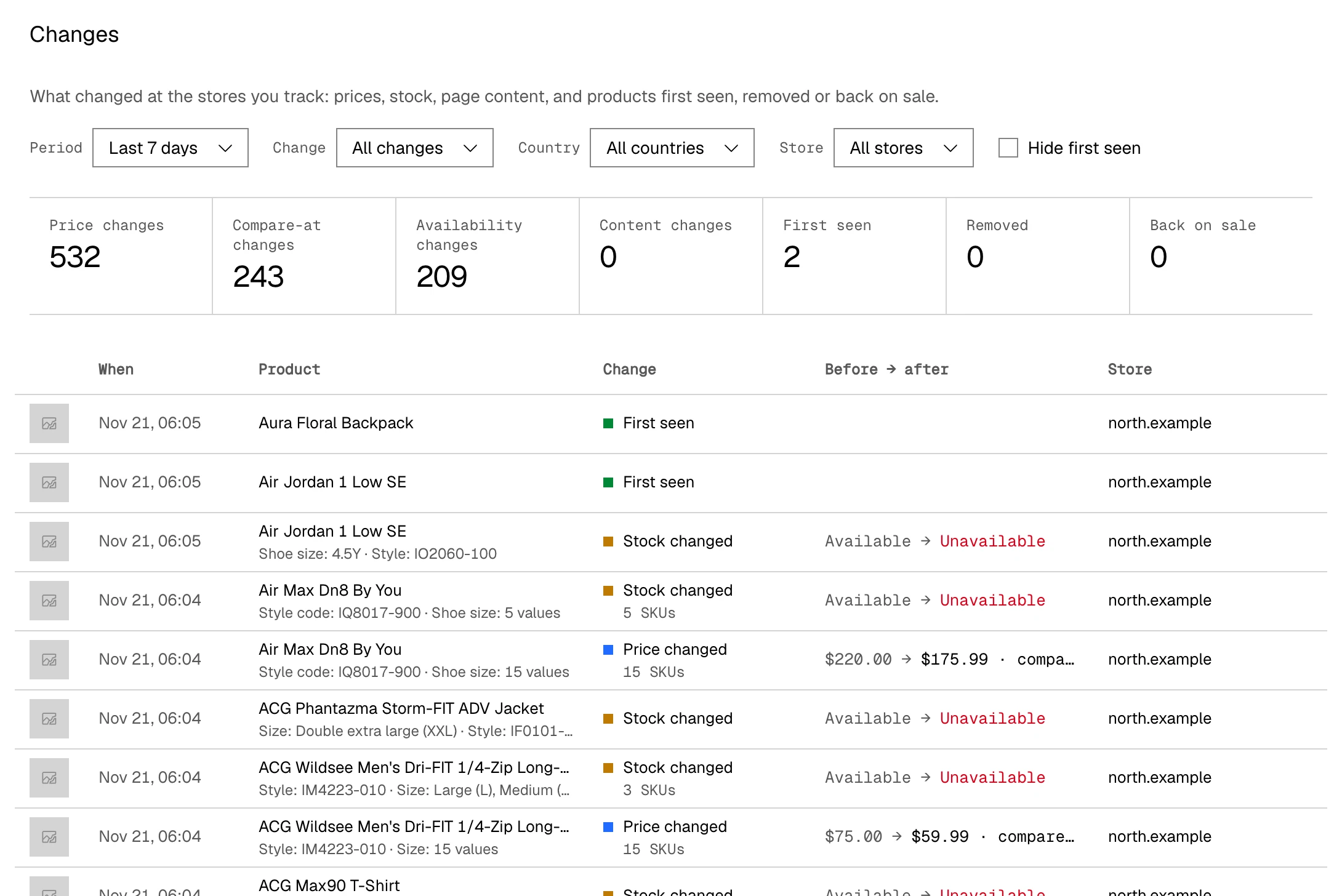
The page fixes the end of the period when it opens or when you change Period, so paging stays on the same Changes. Reload it to include newer ones. The tiles on Overview open this page on their period and kind of Change: the price tiles on every price change, the stock tiles on every stock change.
API
List Changes
GET /v1/changes lists the Changes observed in a window, newest first.
The response holds the page of Changes in data, summary (the count of
matching Changes by entity and event over the whole window), count (their
total), countries (the countries with any Change in the window, whatever
the filters), window, to, and next_cursor, null on the last page.
There is no Run filter: each Change carries its run_id.
Count activity over time
GET /v1/activity counts six kinds of event in a window, in total, per Store,
and per time bucket:
Each event counts: a price cut twice counts twice, and a price that moves and comes back counts both moves, so the buckets add up to the totals. Content, compare-at price, and SKU Changes are in the Changes list only.
The response holds totals, stores (each Store with at least one event),
buckets (every bucket of the window, empty ones included), and the median
percentage of the window's price decreases and increases.
GET /v1/activity/events lists the events of one kind: price_decrease,
price_increase, out_of_stock, restocked, listing_added, or
listing_removed. It takes the same from and to, an optional store_id,
and limit (10 by default, at most 100). Price events come largest change
first, the others newest first. Each event names its Store and Listing, its
SKU and Variant when it has them, the values before and after, and its
change_id in the Changes list. These are the lists behind Biggest price
moves and Stock on Overview.
A window too large to count within the query budget returns
scope_too_large: shorten it.
Changes and activity count every event. Price movements and Availability changes report each series' net change since a date instead, so a price that moves and comes back is unchanged there: see Analyses.
Webhooks
Two webhook events report Changes:
run.changesfollows the final status of a Run whose PDPs found any of the six activity events;import.changesdoes the same for an Import.
Neither is sent when nothing changed, nor again when a restarted Run finds
the same counts, and never one per Change. The event's data is the Run or
Import, not its Changes. To read a Run's Changes, request GET /v1/changes
for its Store with to at the Run's finished_at and a window that reaches
back to its started_at, and keep the Changes whose run_id is the Run's;
GET /v1/activity takes the same times as from and to. An Import's
Changes all carry its created_at, so request a window that includes it.
The dashboard's notifications show the same counts as Changes found.