
Overview
Explore reads the model your PDPs build: your Stores, their Listings and SKUs, the SKUs' offers and Changes, and the Products and Variants that matching assigns your SKUs to. It is included on every plan, and reading it uses no credits. The semantic model defines each entity and its grain.
Overview, the dashboard's first page, sums it up for a period you pick at the top: 1D, 1W (the default), 1M or 3M.
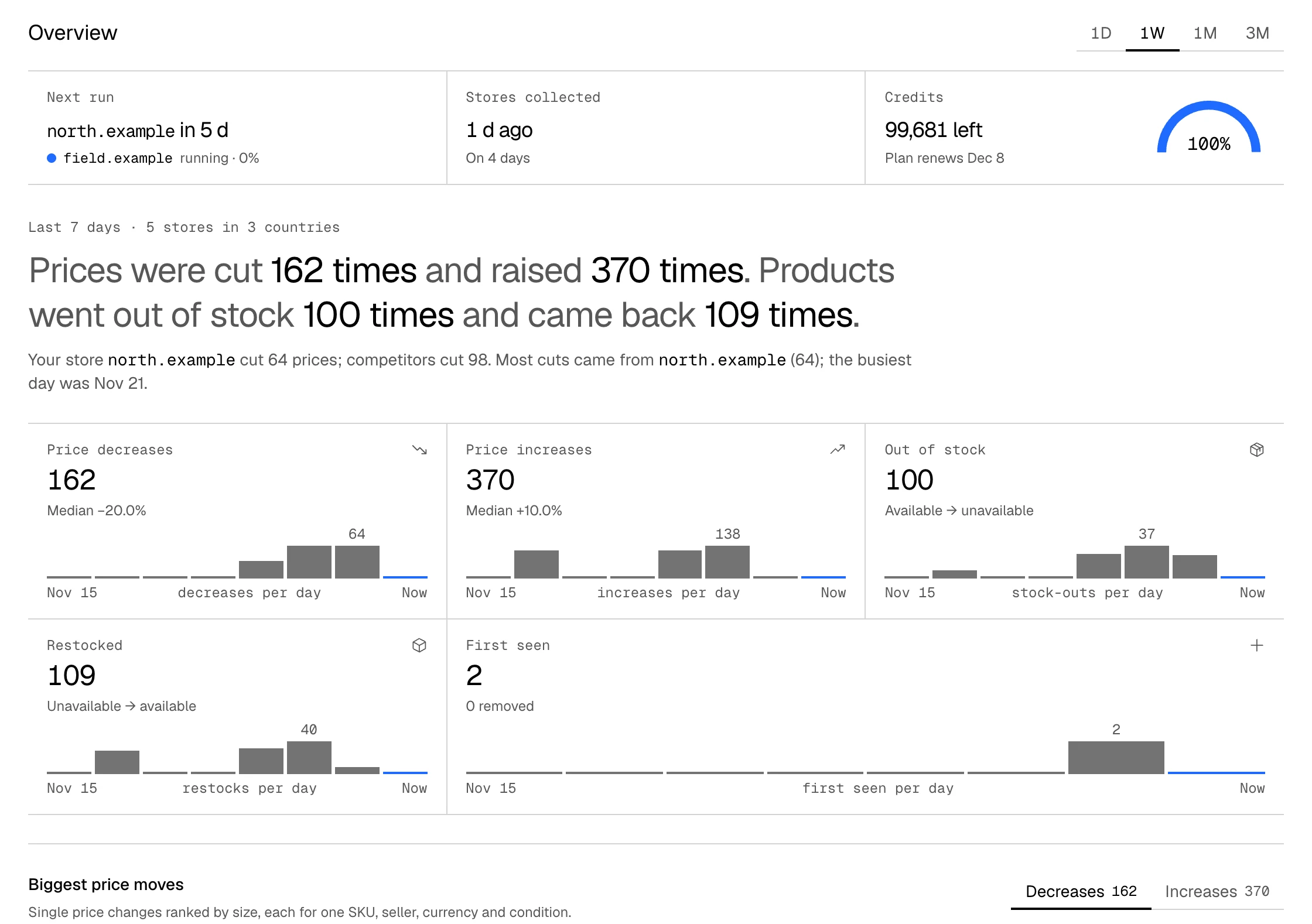
What Overview shows
- Next run, Stores collected and Credits show when the next scheduled Run starts, when your Stores were last read, and your credit balance, with the date it renews, expires or runs out at this pace.
- A sentence sums up the period: how often prices were cut and raised, and products went out of stock and came back, with your store's cuts apart from your competitors'.
- The tiles count the period's Price decreases, Price increases, Out
of stock, Restocked and First seen events, from
GET /v1/activity. Select one to open its kind of Change in Explore > Changes: price changes, stock changes or products first seen. The 3M period has no Changes window, so its tiles don't link. - Biggest price moves and Stock list the largest price changes and the latest stock changes, each linked to its Variant.
- Your store against the market compares your store's current prices with the other Stores of its country: its Price index, and the products furthest from the median. It uses the Store you marked as yours, or else the Store with the most products to compare, and is titled Price position then.
- By store lists each Store with its schedule or Run in progress, its price decreases and increases, stock changes and new products in the period, and its Cheapest share.
- Work with your data holds the Agent's message box and suggested questions on Scale.
Until one of your Stores has two completed Runs, there are no changes to report, and Overview shows what the first reads collected (availability, categories and brands) instead, with the next steps: a Schedule, or another store of the same country to compare with. During the grace period after a Scale subscription ends, Overview shows the way back to Scale instead.
Mark a Store as yours with Mark as your store on its page in Extract > Stores: see Your own stores.
Store figures
GET /v1/stores lists your tracked Stores, and each one's state holds its
current figures, the ones behind By store. state is null before a
Store's first read.
Cheapest share compares new, available offers of matched SKUs on Listings
that are not stale, reduced to each Store's lowest price per Variant, country
and currency. A Variant is comparable for a Store when that Store and at least
one other Store of the same country and currency both offer it this way. The
Store is cheapest for a comparable Variant when its price is the lowest
observed, ties counting for every Store at that price. cheapest_share is
cheapest_variant_count over comparable_variant_count, and null without a
comparable Variant. Query semantics
defines it in full.
max_staleness_days (1 to 365, 30 by default) sets when a Listing counts as
stale.
Where to look next
Explore describes the Stores, countries and observation times you chose to read, not the whole market, and holds no sales, traffic or market share. See Scope boundaries.